
Enterprise Resource Planning System
What Is an Enterprise Resource Planning System? A Plain-English Guide for Singapore SMEs
An enterprise resource planning system is one shared software platform that runs your finance, inventory, sales, HR, and operations from a single database. This guide explains how ERP works, what the modules do, cloud versus on-premise, off-the-shelf versus custom, and what implementation actually involves.
Custom enterprise resource planning (ERP) software, built for Singapore SMEs. From $3.5k onwards.
Where Singapore SMEs feel stuck
Most off-the-shelf ERP software is built for someone else's workflow. We design around yours.
The same data lives in five places
Customer details, stock levels, and prices sit in separate spreadsheets, accounting software, and chat threads that never agree with each other.
Nobody trusts the numbers
Month-end reporting means chasing colleagues for the latest file, then reconciling versions by hand before anyone can make a decision.
Work is retyped between departments
Sales writes a quote, operations retypes it into a job sheet, and finance retypes it again into an invoice. Every retype is a chance for an error.
Stock and jobs are invisible
You cannot see what is in the warehouse, which orders are late, or which jobs are losing money without walking the floor and asking around.
The business depends on one person's memory
Processes live in the heads of a few key staff. When they are on leave or resign, things fall through the cracks.
Growth makes it worse, not better
More customers and staff multiply the spreadsheets and WhatsApp threads. The workarounds that got you here start breaking.
What we build into your ERP
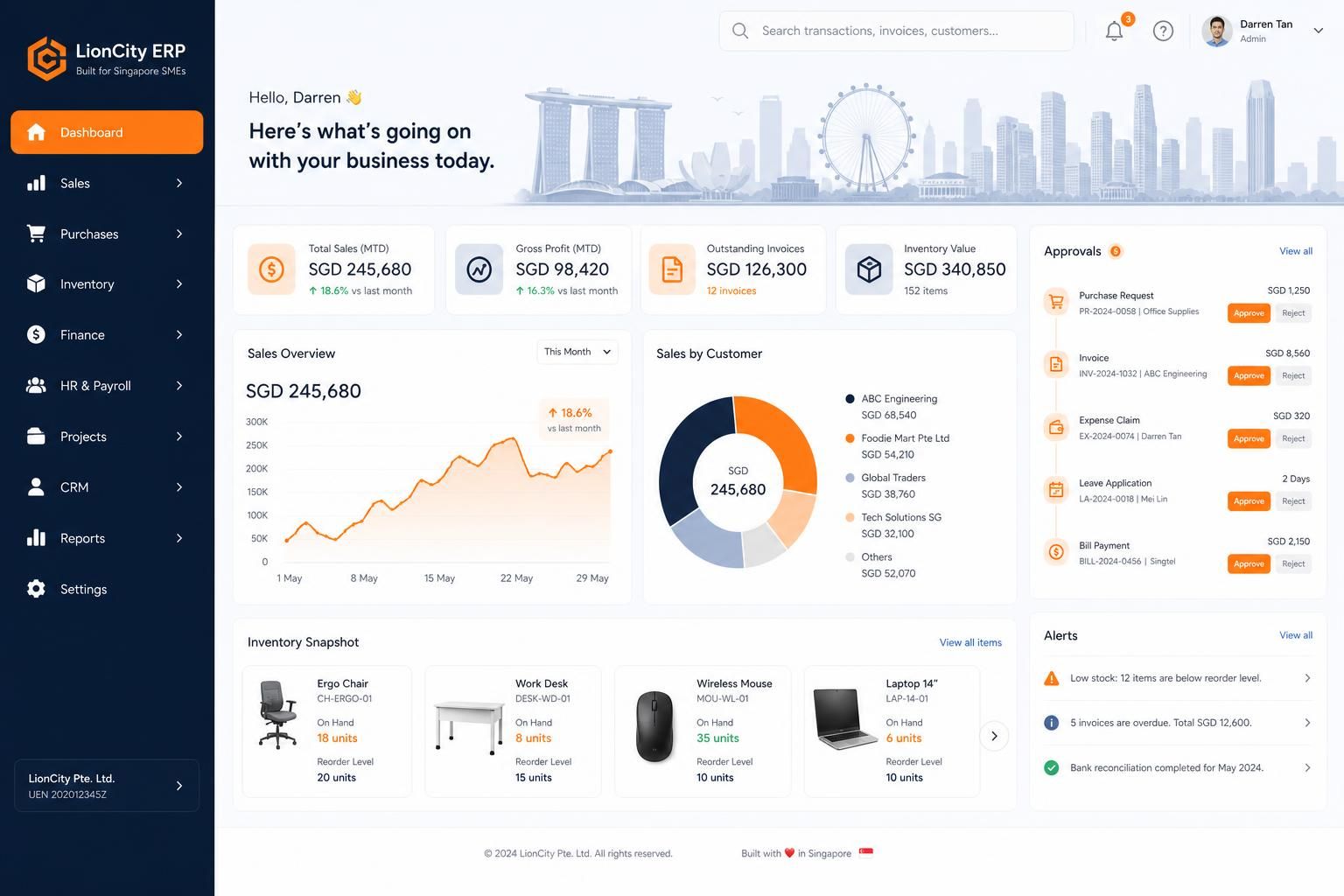
Pick the modules that match how your team actually works. Everything connects to a single source of truth.
Finance and Accounting
Invoices, payments, GST, bank reconciliation, and profit reporting drawn from the same records the rest of the business uses.
Inventory and Warehouse
Stock levels, locations, reorder points, batch or serial tracking, and stocktakes that match what is physically on the shelf.
Sales and CRM
Leads, quotations, orders, and customer history in one place, so accepted quotes flow into delivery without retyping.
Purchasing
Purchase requests, supplier orders, goods receipt, and cost tracking linked to the jobs or stock they belong to.
Operations and Projects
Jobs, work orders, schedules, and delivery tracking, whether you run projects, production, or daily service work.
HR and Payroll Basics
Staff records, leave, claims, and timesheets connected to the jobs and costs they relate to.
Reporting and Dashboards
Live views of sales, cash, stock, and job profitability, instead of a spreadsheet someone rebuilds every month.
Integrations
Connections to the tools you already use, such as accounting software, e-commerce platforms, payment providers, and InvoiceNow-ready e-invoicing workflows.
AI Assistance
Modern ERP systems can use AI to draft documents, summarise records, flag anomalies, and answer questions about your own data.
How we deliver
Map how the business really works
Implementation starts with understanding your actual workflows, documents, and exceptions, not the textbook version of your industry.
Configure or build, then migrate data
The system is set up around your processes, and existing customer, stock, and transaction data is cleaned and moved in.
Train, go live, and refine
Staff are trained on their part of the system, you go live module by module, and the setup is adjusted as real usage reveals gaps.
Off-the-Shelf ERP vs Custom ERP
Off-the-shelf ERP
- Faster to start if your processes match the software's assumptions.
- Licence fees are usually per user, per month, forever.
- Workflows that do not fit require workarounds or paid customisation.
- You adapt the business to the software, not the other way around.
Custom ERP
- Built around your actual workflows, documents, and pricing logic.
- You own the system; no per-user licence fees stacking up as you hire.
- Only the modules you need, added in phases as the business grows.
- Makes most sense when your processes are genuinely different from the norm.
The Core Modules of an ERP System
Finance is the backbone
Every ERP is anchored on finance. Because invoices, payments, and costs come from the same records as sales and stock, your accounts reflect reality instead of a month-old export.
Inventory keeps the shelf and the screen in sync
Stock movements are recorded as they happen: goods received, items picked, deliveries made. Reorder alerts fire from real levels, not from someone's memory.
Sales and CRM close the loop
A lead becomes a quote, the quote becomes an order, and the order becomes an invoice, all in one thread. Follow-ups and customer history stop living in personal chat logs.
Operations turns orders into delivered work
Job sheets, work orders, schedules, and delivery notes draw from the same order data sales entered, so nothing is retyped and nothing is missed.
HR connects people to the work
Leave, claims, and timesheets tie staff time to jobs and costs, which is what makes job profitability reporting honest.
Cloud vs On-Premise ERP
Cloud ERP runs in the browser
The system is hosted on servers managed for you, and staff log in from any device. Updates, backups, and security patches are handled centrally. For SMEs without in-house IT, it is usually the simpler starting point.
On-premise ERP runs on your own servers
You buy and maintain the hardware, and your IT team manages updates and backups. It offers direct control over where data sits, at the cost of upfront hardware spend and ongoing maintenance.
How to choose
Cloud suits teams that work across locations, want predictable costs, and do not have in-house IT. On-premise is mainly chosen when a regulator, contract, or existing infrastructure requires it.
Off-the-Shelf vs Custom ERP in Practice
When off-the-shelf works well
If your business runs standard processes, a mature packaged ERP can be a sensible choice: it is proven, documented, and quick to deploy.
Where packaged ERP strains
Businesses with unusual pricing, mixed service-and-product models, or industry-specific documents often end up paying for customisation on top of licences, or living with workarounds.
When custom makes more sense
If the workarounds are the business, custom wins. Digital 9 Labs has built custom systems for Singapore businesses across dental clinics, interior design, corporate gifting, aesthetics and wellness, insurance agencies, F&B catering, specialty retail, trading and distribution, construction, and finance, including a custom point-of-sale system for a Singapore beauty chain and an InvoiceNow-ready e-invoicing web app.
A note on grants
In Singapore, packaged solutions from pre-approved vendors typically fall under PSG, while custom software projects generally map to the Enterprise Development Grant (EDG) instead. Eligibility and approval are decided by the agencies, not the vendor, so treat any grant as a possibility to verify, not a promise.
What Drives the Cost of an ERP System
Number of modules and users
More modules mean more workflows to configure or build, and packaged systems usually charge per user, so headcount directly affects ongoing cost.
How different your processes are
The further your workflows sit from the software's assumptions, the more customisation, and cost, is involved. This is often the deciding factor between packaged and custom.
Data migration and integrations
Cleaning years of spreadsheet data and connecting accounting, e-commerce, or payment tools takes real work and is frequently underestimated.
Training and change management
A system nobody uses is the most expensive kind. Budget time for training and for the first months of parallel running and refinement.
Trusted by teams across Singapore
Ask us whether an ERP system fits your business
Tell us about the workflows you want to improve. We'll respond within 24 hours.
Frequently asked questions
What SME teams usually want to know before they commit to a custom ERP or workflow system.