
Cloud ERP Singapore
Cloud ERP Singapore: Run Your ERP on Cloud, Not on an Office Server
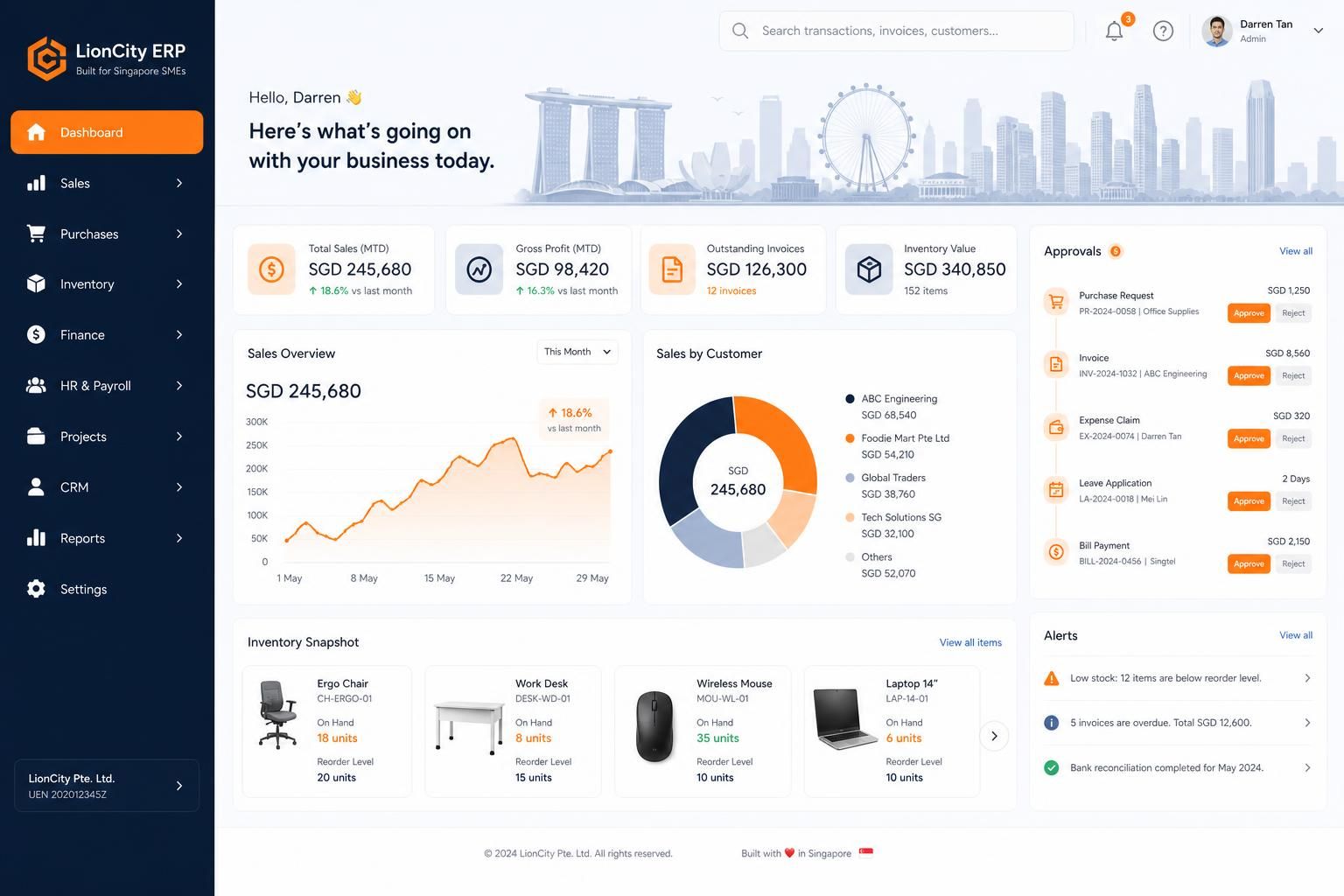
Digital 9 Labs builds custom ERP on cloud infrastructure for Singapore SMEs. Your team logs in from any browser, updates ship without downtime, backups run automatically, and there is no server sitting in the office that someone has to maintain.
Custom enterprise resource planning (ERP) software, built for Singapore SMEs. From $3.5k onwards.
Where Singapore SMEs feel stuck
Most off-the-shelf ERP software is built for someone else's workflow. We design around yours.
The system only works in the office
Legacy or on-premise software ties your team to one location or a clunky remote desktop, so approvals and stock checks wait until someone is physically back at a desk.
Nobody maintains the server
On-premise ERP needs someone to patch the operating system, renew licences, and watch disk space. In most SMEs, nobody actually does this until something breaks.
Backups are an afterthought
If the office server fails, floods, or gets hit by ransomware, years of orders, invoices, and customer records can disappear with no tested way to recover them.
Updates never happen
Upgrading on-premise software is disruptive and expensive, so companies run versions that are years out of date, missing fixes and security patches.
Data lives in spreadsheets instead
Because the old system is painful to use remotely, staff export everything to Excel and WhatsApp, and the 'real' data ends up scattered across personal laptops.
Data security is unclear
Customer records on a shared office PC with one password for everyone is a PDPA problem waiting to surface. There is no access control and no audit trail.
What we build into your ERP
Pick the modules that match how your team actually works. Everything connects to a single source of truth.
Browser-based Access
The whole system runs in a web browser on laptop, tablet, or phone. No installs, no VPN, no remote desktop.
Role-based Permissions
Each staff member gets their own login and sees only what their role allows, with an audit trail of who changed what.
SG-region Hosting
We can deploy on cloud infrastructure with Singapore-region data residency where your requirements call for it.
Automatic Backups
Databases are backed up on a schedule with point-in-time recovery, so a mistake or failure does not mean lost history.
Zero-downtime Updates
New features and fixes are deployed to the cloud without your team installing anything or stopping work.
Sales, Inventory and Operations
Quotations, orders, stock, delivery, and job tracking built around how your business actually runs, not a generic template.
Finance and Invoicing
Invoices, payment tracking, and GST-ready records. We have built an e-invoicing web app with InvoiceNow-ready workflows.
Integrations and APIs
Connect to accounting tools, payment providers, or e-commerce platforms through APIs instead of manual re-entry.
Migration Tooling
Structured imports to bring your existing spreadsheets or legacy system data across cleanly, with validation before go-live.
How we deliver
Map your operations
We sit with your team to understand workflows, current spreadsheets or legacy systems, and what data needs to move.
Build on a modern web stack
We develop your ERP as a secure web application on cloud infrastructure, with SG-region hosting options and role-based access from day one.
Migrate and go live
We import your existing data, run the new system alongside the old one until the numbers reconcile, then switch over.
On-premise or Legacy ERP vs Custom Cloud ERP
On-premise / legacy ERP
- Runs on an office server that someone must patch, back up, and eventually replace.
- Remote access means VPNs or remote desktop, which staff avoid using.
- Upgrades are disruptive projects, so versions fall years behind.
- A hardware failure, theft, or ransomware event can take the business data with it.
Digital 9 Labs custom cloud ERP
- Runs in the browser from anywhere, with per-user logins and permissions.
- Hosting, patching, and scaling are handled in the cloud, not by your staff.
- Updates ship continuously with no installs and no downtime for your team.
- Automatic backups and recovery options protect your records if things go wrong.
Five-Year Cost, Cloud Versus Licence
Hosting is rarely the deciding line. The per-seat licence usually is.
Include site, warehouse and part-time staff. Per-seat licences charge for all of them.
The quoted per-seat price, before implementation.
Commonly 50% to 150% of first-year licence.
A focused first module starts from about S$3,500; a departmental system runs into the tens of thousands.
Billed at cost to your own account.
The per-seat line grows with headcount; a build does not.
EDG can support up to 50% of qualifying costs for eligible local SMEs, on reimbursement. Confirm with Enterprise Singapore.
Illustrative only. Substitute your own quoted figures. Implementation, migration and your own team time (8 to 15 hours per module) apply to both routes and are not modelled here.
Every figure stays in your browser: nothing is submitted. See all free tools
What Cloud ERP Means in Practice
It is just a website your company owns
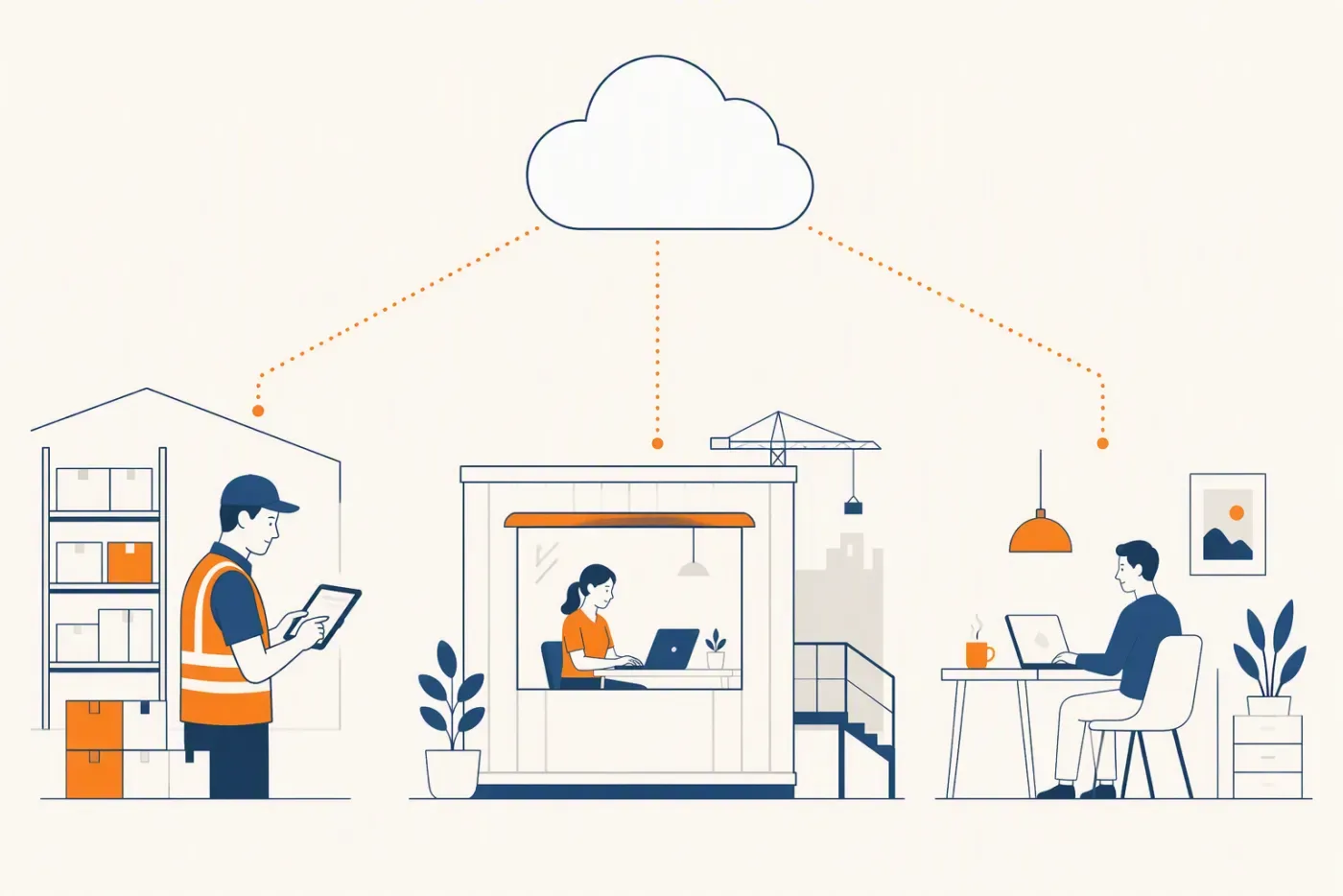
A cloud ERP is a secure web application: your team opens a URL, logs in, and works. There is nothing to install and nothing to host in your office.
- Opens in a browser, no install
- Same system on desktop and phone
- One address for the whole team
Access from anywhere
Directors approve quotes from home, warehouse staff update stock on a tablet, and sales check order status at the client's office.
- Site, warehouse, home or overseas
- No VPN to configure per person
- Access revoked centrally when someone leaves
No server maintenance
The cloud provider handles the hardware; we handle the software. Your team never patches an operating system or swaps a failed disk.
- No box in a cupboard to patch
- No weekend downtime for updates
- Capacity scales without procurement
Disaster recovery built in
Scheduled backups and recoverable databases mean a laptop theft or office incident does not touch your operational history.
- Automated backups, tested restores
- A failed laptop is not a data loss
- Recovery measured in minutes
PDPA and Data Security Considerations

Data residency
PDPA does not ban overseas hosting, but you must ensure comparable protection. Where clients prefer it, we deploy with Singapore-region hosting so data stays in-country.
- You choose the region it is hosted in
- Documented for your own compliance answers
- Exportable in full at any time
Access control
Individual logins, role-based permissions, and audit trails replace the shared-password office PC, so you can show who accessed what and when.
- Permissions by role, not by trust
- Sensitive screens hidden, not just discouraged
- Every change attributable to a person
Encryption
Traffic runs over HTTPS and data is encrypted at rest by the underlying cloud database, which is a stronger baseline than most office servers.
- In transit and at rest
- Standard practice, not an upgrade
- Credentials never stored in plain text
Offboarding staff
When someone leaves, you disable one account. Nothing lives on their personal laptop or in their export folder.
- Access removed in one action
- No shared password to rotate
- Their records stay, their access does not
Migrating from Spreadsheets or a Legacy System

Start from your real files
We study the spreadsheets and legacy exports your team actually uses, because they encode how your business really works.
- Migrate what you actually use
- Leave dead data in the old system
- Archive rather than import everything
Clean as you migrate
Duplicates, inconsistent naming, and dead records get resolved during import with validation reports, not carried over blindly.
- Duplicates merged before go-live
- Inactive records marked, not deleted
- Fields standardised once
Run in parallel first
For critical numbers like stock and outstanding invoices, we run old and new side by side until they reconcile, then cut over.
- Both systems live for one cycle
- Compare outputs before switching
- Confidence earned rather than assumed
Keep the exports
Your data stays yours: the system supports exports throughout, so you are never locked in.
- Scheduled exports you control
- Readable formats, not a proprietary blob
- Your data is yours if we part ways
What Cloud Actually Changes, With Numbers
Illustrative arithmetic for a 20-person Singapore SME comparing an on-premise server to a hosted system.
The server you no longer buy
A small business server plus UPS and setup is commonly S$6,000 to S$10,000, replaced every four to five years.
- S$6,000 to S$10,000 per refresh
- Replaced every four to five years
- Plus the space it occupies
The maintenance you no longer schedule
Patching, backup checks and the occasional failure typically absorb several IT support hours a month.
- Say 4 hours a month of support
- Roughly S$3,000 a year at S$60 an hour
- Weekend downtime for major updates
What hosting costs instead
Hosted infrastructure for an SME system commonly runs S$50 to S$300 a month depending on load, billed to your own account at cost.
- S$600 to S$3,600 a year
- Billed to you directly, no reseller margin
- Scales without procurement
The recovery difference
A failed on-premise server is measured in days. A hosted system with tested backups is measured in minutes.
- Automated backups, restores tested
- No single box to lose
- Staff keep working from anywhere
The access difference
Site, warehouse and home access without a VPN to configure per person, and revocation in one action when someone leaves.
- Browser access, no install
- Permissions by role
- Offboarding in one action
What you should still insist on
Cloud is not a reason to lose control of your data. Insist on region choice, full export and documented access.
- You choose the hosting region
- Full export on demand, readable formats
- Access documented and auditable
Questions to Ask Before You Move to the Cloud
Cloud is not automatically better. These are the questions that separate a good move from a regretted one.
Where will the data physically live
Region matters for your own compliance answers, and it should be your decision rather than a default.
- Region chosen, not assumed
- Documented for audit
- Changeable if requirements change
How do I get my data out
A system you cannot export from is a system you cannot leave. Ask before you commit, not after.
- Full export on demand
- Readable formats, not a proprietary blob
- Scheduled exports you control
What happens when the internet drops
Some workflows must survive a bad connection. Decide which ones and design for it.
- Critical capture tolerant of dropouts
- Sync when the connection returns
- Known behaviour, not a surprise
Who can see what
Permissions should be by role and auditable, not managed by trust and shared logins.
- Role-based access
- Sensitive screens hidden, not discouraged
- Every change attributable
How is it backed up, and has a restore been tested
An untested backup is a belief, not a safeguard.
- Automated, frequent backups
- Restores actually tested
- Recovery time you have measured
What does it cost as we grow
Hosting should scale with load, not with headcount. Check which one you are being charged for.
- Billed on infrastructure, not seats
- Costs visible on your own account
- No reseller margin in between
What Moving Actually Looks Like
A migration done properly is boring. These are the five steps that keep it that way.
Inventory what you actually use
Most systems hold years of data nobody reads. Decide early what must move and what becomes an archive.
- List what is genuinely used weekly
- Archive the rest, do not import it
- Agree the cutoff date in writing
Clean before you migrate
Duplicates and inconsistent fields multiply once they are in the new system. Clean once, at the door.
- Merge duplicate customers and suppliers
- Standardise fields before import
- Mark inactive rather than deleting
Run both for one full cycle
One complete month with both systems live is what turns confidence from a hope into evidence.
- One full cycle in parallel
- Compare outputs, not impressions
- Rollback stays possible throughout
Train on real records
People learn on their own data, in short sessions per role, not in one long generic walkthrough.
- Short sessions, by role
- Their own live records
- Repeat after the first week
Keep the exports running
Scheduled exports you control mean you are never locked in, whatever happens to any vendor relationship.
- Scheduled, automatic exports
- Readable formats you can open
- Stored somewhere you control
Budgeting the Project Properly
Illustrative arithmetic so you can build a board paper rather than react to a quote. Substitute your own figures throughout.
Phase one, the proving module
Budget S$3,500 to S$12,000 for one workflow solved end to end, live in 4 to 8 weeks on a fixed quote.
- S$3,500 entry, fixed after review
- 4 to 8 weeks to live
- One workflow, fully solved
Phase two, the department
Once phase one is in daily use, a departmental build covering 3 to 4 linked workflows typically runs S$25,000 to S$60,000.
- 3 to 4 linked workflows
- S$25,000 to S$60,000 typical
- Scoped from evidence, not a wish list
Phase three, the operation
Sales, stock, finance, approvals and reporting together is a six-figure programme and should run across 12 to 18 months, not one quarter.
- 12 to 18 months, phased
- Each phase funds the next
- No single big-bang go-live
Internal time to reserve
Budget 8 to 15 hours of your own team's time per module for interviews, testing and training. This is the line most plans omit.
- 8 to 15 hours per module
- Spread across 6 to 8 weeks
- Mostly the person who does the work
Running cost after go-live
Hosting for an SME system commonly runs S$50 to S$300 a month billed at cost to your own account, plus optional care quoted by scale.
- S$600 to S$3,600 a year hosting
- Billed to you at cost
- Care optional, quoted by scale
The comparison to run
Against a 20-seat licence at S$120 a month, five years is S$144,000 before implementation. Run both numbers over 5 years before deciding.
- 20 x S$120 x 12 = S$28,800 a year
- S$144,000 over 5 years, licence only
- Compare 5-year totals, not monthly
Grant treatment
EDG can support up to 50% of qualifying costs for eligible local SMEs on a custom build, on reimbursement, and the project must not start before applying. PSG does not cover custom work.
- Up to 50% of qualifying cost
- Reimbursement, not upfront
- Apply before starting
- Confirm with Enterprise Singapore
Sizing and Cost, With Numbers
Illustrative infrastructure arithmetic for a Singapore SME. Substitute your own user count and data volume.
A 10 to 20 user system
Typically runs comfortably on infrastructure costing S$50 to S$120 a month, including database and application hosting.
- S$600 to S$1,440 a year
- 10 to 20 concurrent users
- Scales without a hardware order
A 20 to 60 user system
Usually S$120 to S$300 a month once background jobs, file storage and reporting load are included.
- S$1,440 to S$3,600 a year
- 20 to 60 users
- Storage billed on what you use
Against an on-premise server
A small business server at S$6,000 to S$10,000 replaced every 4 to 5 years is S$1,500 to S$2,500 a year before any support time.
- S$6,000 to S$10,000 per refresh
- Every 4 to 5 years
- Plus 4 hours a month of support
The support hours you stop paying
At 4 hours a month and a loaded S$60 an hour, on-premise maintenance is roughly S$2,880 a year.
- 4 hours x S$60 x 12 = S$2,880
- Patching, backups, failures
- Plus weekend downtime windows
Recovery time difference
A failed on-premise server is commonly 1 to 3 days to restore. A hosted system with tested backups is minutes.
- 1 to 3 days versus minutes
- Backups automated, restores tested
- Staff keep working meanwhile
The 5 year comparison
Roughly S$7,000 to S$18,000 hosted, against S$20,000 to S$27,000 on-premise once hardware and support time are counted.
- Hosted: S$7,000 to S$18,000
- On-premise: S$20,000 to S$27,000
- Before counting downtime cost
Implementing Cloud ERP: Week by Week
Illustrative sequencing for a first module. Dates slip, but the order rarely should.
Week 1: watch the work
We sit with the people doing the job and follow one real case end to end, recording every handoff and every place data is retyped.
- 2 to 3 hours of observation
- The doer, not the manager
- One real case, start to finish
- Handoffs written down
Week 2: agree scope and fix the quote
Scope comes from what we watched. The quote is fixed and the assumptions are written down so change is visible later.
- Scope from observation
- Fixed quote issued
- Assumptions listed explicitly
- Out-of-scope named
Weeks 3 to 5: build and show weekly
You see working screens with your own data every week rather than a demo at the end.
- Weekly working build
- Your data, not samples
- Feedback folded in weekly
- No big reveal at the end
Week 6: parallel run
The new system and the old process both run for one full cycle, and the outputs are compared rather than trusted.
- One full cycle in parallel
- Outputs compared line by line
- Rollback stays available
- Confidence earned, not assumed
Week 7: train by role
Short sessions per role on their own live records, then a follow-up after the first week of real use.
- 30 to 60 minutes per role
- Their own records
- Follow-up after week one
- Written quick reference
Week 8: go live and measure
Switch over, then measure the thing you said was costing you hours, so the second module is argued from evidence.
- Measure the original pain
- Compare to the baseline
- Decide module two on evidence
- No expansion without adoption
Cloud ERP: Glossary of Terms
Plain-English definitions of the terms that appear in every vendor conversation, so nothing is agreed by nodding along.
ERP
Enterprise resource planning: one system holding the records that several departments share, so a customer, job or stock item exists once rather than in five files.
- One record, many departments
- Replaces reconciliation with a shared source
- Scope is a choice, not all-or-nothing
Module
A functional area such as quoting, stock or payroll. A custom build means choosing three or four rather than buying twelve.
- Buy or build only what you use
- Modules share one data model
- Added when the last one is adopted
Master data
The reference records everything else points at: customers, suppliers, products, staff, cost codes.
- Cleaned once, maintained forever
- Duplicates here corrupt every report
- Owned by a named person
Transactional data
The events: quotes, orders, receipts, invoices, payments, timesheets. Volume grows daily; master data does not.
- Grows with trading volume
- Immutable once posted
- Corrections by reversal, not edit
Source of truth
The system everyone agrees to believe when two numbers disagree. Naming it is a management decision, not a technical one.
- Named explicitly, in writing
- Other systems reconcile to it
- Ambiguity here causes most disputes
Integration
A connection letting two systems exchange records automatically instead of by export and import.
- API or scheduled file exchange
- Direction matters: push, pull or both
- Failure handling is the hard part
API
An interface letting software talk to software. If a vendor has none, every future connection is manual.
- Ask before you buy
- REST is the common standard
- Rate limits and auth are the details
Audit trail
The record of who changed what and when. The difference between an explanation and an argument.
- Every change attributed
- Retained, not overwritten
- Required for most audits
Role-based access
Permissions granted by job function rather than by trust, so leavers are offboarded in one action.
- Permission by role, not person
- Sensitive screens hidden
- Revoked centrally
Cost code
The label that puts a cost against the job, department or project it belongs to.
- Applied at purchase, not month end
- Drives job profitability
- Kept short and stable
Committed cost
Money promised but not yet invoiced, usually at purchase order. The figure spreadsheets almost never capture.
- Visible at PO, not at invoice
- Early warning on overruns
- Distinct from actual cost
Reconciliation
Checking two records agree. Most of it exists because data was entered twice.
- Symptom of duplicate entry
- Removed by integration
- Never fully eliminated
Data migration
Moving existing records into the new system, usually the longest and least glamorous task.
- Cleaning is the larger half
- Archive rather than import everything
- Agree a cutoff date
Parallel run
Operating old and new together for one cycle so outputs can be compared before switching.
- One full cycle minimum
- Compare, do not assume
- Rollback stays available
Go-live
The point the new system becomes the record. Best done one module at a time.
- Never on a Friday
- One module, not twelve
- Support present for week one
User acceptance testing
The client testing that the system does what was agreed, using real scenarios rather than a script.
- Real cases, not happy paths
- Done by the people who will use it
- Sign-off before go-live
Change request
Work outside the agreed scope. Named and priced openly so it does not become an argument.
- Written, not verbal
- Priced before it is built
- Scope baseline retained
Technical debt
Shortcuts that make the next change slower. Sometimes worth taking deliberately, never worth taking silently.
- Recorded when taken
- Repaid before it compounds
- Invisible debt is the dangerous kind
Uptime
The share of time the system is available. Ask what it is measured against and who reports it.
- Measured, not promised
- Excludes planned maintenance
- Meaningless without monitoring
Backup and restore
Copies of your data, and the tested ability to bring them back. Only the second one matters.
- Automated and frequent
- Restore actually tested
- Recovery time measured
SSO
Single sign-on: one login across systems, so access is granted and revoked in one place.
- Central control of access
- Faster offboarding
- Fewer shared passwords
Two-factor authentication
A second proof of identity beyond the password. The cheapest security improvement available.
- Enabled for all admin users
- App-based beats SMS
- Recovery codes stored safely
PDPA
Singapore's Personal Data Protection Act, governing how personal data is collected, used and kept.
- Applies to staff and customer data
- Consent and purpose matter
- Breach obligations exist
GST
Goods and services tax, applied per line with the correct category. Errors here are a filing problem.
- Category per product, not per invoice
- Tax invoice timing matters
- Credit notes must reverse cleanly
Peppol
The international network standard behind structured e-invoicing, used by InvoiceNow in Singapore.
- Documents routed, not emailed
- Validated before acceptance
- Each participant has an identifier
CPF
Central Provident Fund: statutory contributions varying by age band and residency status.
- Rates change; confirm with CPF Board
- PR rates step up over two years
- Computed by the payroll run
SDL
Skills Development Levy, payable on top of CPF and computed in the same run.
- Applies alongside CPF
- Part of the payroll computation
- Not an optional extra
EDG
Enterprise Development Grant: supports up to 50% of qualifying costs for eligible local SMEs, on reimbursement.
- Custom builds may qualify
- Apply before the project starts
- Confirm with Enterprise Singapore
PSG
Productivity Solutions Grant, which funds pre-approved packaged solutions rather than custom work.
- Packaged solutions only
- Custom builds do not qualify
- Check the approved list first
SaaS
Software as a service: rented software, priced per user per month, hosted by the vendor.
- Recurring, not one-off
- Cost scales with headcount
- Vendor owns the roadmap
On-premise
Software running on a server you own and maintain, with the costs and control that implies.
- Hardware refresh every 4 to 5 years
- You own patching and backups
- Full control of the data
Total cost of ownership
Licence plus implementation plus migration plus training plus upgrades, over five years rather than one.
- Five years, not monthly
- Include internal time
- The only fair comparison
Vendor lock-in
The cost of leaving. Measured by whether you can export your data and who owns the code.
- Ask about export before buying
- Code ownership in writing
- Proprietary formats are the trap
Scalability
Whether the system copes as volume grows, and what it costs when it does.
- Load versus headcount pricing
- Test at 3x current volume
- Ask what breaks first
Workflow
The sequence of steps and approvals a piece of work passes through, and who owns each.
- Mapped before it is built
- Handoffs are where cost hides
- Encoded once, applied always
Approval threshold
The value above which something needs a second person to agree. Enforced by the system rather than by habit.
- Set by role and by value
- Auditable
- Prevents surprise discounts
Dashboard
A live view of the numbers management asks for, computed from records rather than assembled monthly.
- Live, not monthly
- Same data the team uses
- Few numbers, chosen deliberately
Reporting period
The window a report covers. Agreeing it prevents two people producing different truths.
- Defined and consistent
- Cutoff time stated
- Comparable period on period
Prerendering
Serving fully-formed HTML so crawlers and AI assistants read the content without running JavaScript.
- Content visible without JS
- Faster first paint
- Essential for search visibility
Agentic automation
Software that acts on records rather than only reporting on them, with human approval on anything consequential.
- Acts, not just reports
- Approval gates on money and messages
- Only as good as the data
Cloud ERP: The Numbers, Collected
Illustrative Singapore figures gathered in one place. Substitute your own throughout: these size a decision, they do not predict your quote.
Typical first module
S$3,500 to S$12,000, live in 4 to 8 weeks on a fixed quote after the workflow review.
- S$3,500 entry point
- 4 to 8 weeks to live
- Fixed after review
Typical departmental build
S$25,000 to S$60,000 covering 3 to 4 linked workflows once the first module is adopted.
- 3 to 4 workflows
- S$25,000 to S$60,000
- Scoped on evidence
Typical full programme
Six figures across 12 to 18 months, phased so each stage proves itself before the next.
- 12 to 18 months
- Phased, not big bang
- Each stage funds the next
Hosting
S$50 to S$300 a month for an SME system, billed at cost on your own account.
- S$600 to S$3,600 a year
- Billed at cost
- Scales on load, not headcount
Licence comparison
20 seats at S$120 a month is S$28,800 a year, or S$144,000 over five years before implementation.
- 20 x S$120 x 12 = S$28,800
- S$144,000 over 5 years
- Plus implementation
Implementation on a licence
Commonly 50% to 150% of first-year licence. Below 30% usually means scope is excluded.
- 50% to 150% typical
- Below 30% is a warning
- Migration often separate
Data migration
S$3,000 to S$15,000 depending on record count and how clean the data is.
- S$3,000 to S$15,000
- Cleaning is the larger half
- Archive rather than import all
Training
2 to 5 days is typical. Fewer than 2 usually makes adoption your problem.
- 2 to 5 days
- Per role, not per company
- Follow-up after week one
Your internal time
8 to 15 hours per module for interviews, testing and training. The line most plans omit.
- 8 to 15 hours per module
- Across 6 to 8 weeks
- Mostly the person doing the work
Admin hire comparison
A back-office hire in Singapore costs roughly S$3,000 to S$4,500 a month before CPF and overheads.
- S$36,000 to S$54,000 a year
- Plus CPF and overheads
- Plus recruitment and cover
Hours reclaimed
A workflow costing 20 hours a month is about 240 hours a year, or S$7,200 at a loaded S$30 an hour.
- 20 hours a month
- 240 hours a year
- About S$7,200
EDG support
Up to 50% of qualifying costs for eligible local SMEs, on reimbursement, applied for before starting.
- Up to 50%
- Reimbursement basis
- Apply before starting
- Confirm with Enterprise Singapore
Cloud ERP: The Buyer's Checklist
Fifteen questions worth asking any vendor, including us, before money changes hands.
Ask for the five-year total
Licence times sixty months plus implementation, migration and training. One number, comparable across vendors.
- 60 months, not one
- All one-off costs included
- Written, not verbal
Ask who owns the code
This single answer determines whether you can ever leave.
- Ownership in writing
- Repository access
- Another developer could take over
Ask about data export
A system you cannot export from is a system you cannot leave.
- Full export on demand
- Readable formats
- Scheduled exports you control
Ask what happens in week one
A vendor who starts with observation is scoping from your problem, not their product.
- Who they interview
- Whether they walk a real job
- What they hand back
Ask what they will refuse to build
A vendor who says yes to everything has not understood the problem.
- Where they recommend off-the-shelf
- What they push back on
- Out of scope on principle
Ask to see it running
Screenshots are not a system. Ask for a populated live environment.
- Live, not slides
- Populated, not empty states
- Someone using it
Ask about the second module
The first is a project; the second tests whether the architecture extends.
- Shared data model
- What clients added later
- How long it took
Ask for the support commitment in hours
Response time in hours, business days defined, escalation path named.
- Hours, not adjectives
- Business days defined
- Named escalation
Ask who maintains statutory logic
CPF, GST and e-invoicing rules change. Someone must own keeping them current.
- Named owner
- In the contract
- Update mechanism stated
Ask about the parallel run
One full cycle with both systems live is what turns confidence into evidence.
- One cycle minimum
- Outputs compared
- Rollback available
Ask what training is included
Two to five days by role, with a follow-up after real use begins.
- Days stated
- Per role
- Follow-up included
Ask how change requests are priced
Scope will change. How that is handled is worth agreeing before it happens.
- Priced openly
- Baseline retained
- Written approval
Ask for a reference you choose
Not the reference they offer. One you pick from their portfolio.
- You pick, not them
- Same size and sector
- Ask what went wrong
Ask what the system will not do
Every system has limits. A vendor who names them is a vendor who understands theirs.
- Named limits
- Workarounds explained
- No magic claims
Ask about hosting and who is billed
Hosting billed at cost to your account avoids a reseller margin you cannot see.
- Billed to you at cost
- Your account, your access
- No hidden margin
Cloud ERP: Cost by Company Size
Illustrative Singapore arithmetic at four sizes. Substitute your own headcount and seat price throughout.
Company of 5 to 10 staff
A first module lands at S$3,500 to S$8,000. Licence alternatives at 8 seats and S$120 a month are S$11,520 a year, so the build repays inside 12 months at this size.
- Build: S$3,500 to S$8,000 once
- Licence: 8 x S$120 x 12 = S$11,520 a year
- 5 years licence: S$57,600
- Break-even under 12 months
Company of 10 to 25 staff
A departmental build of S$25,000 to S$40,000 against 20 seats at S$120, which is S$28,800 a year and S$144,000 over five.
- Build: S$25,000 to S$40,000
- Licence: S$28,800 a year
- 5 years licence: S$144,000
- Break-even in 12 to 18 months
Company of 25 to 60 staff
A build of S$40,000 to S$90,000 against 45 seats at S$120, which is S$64,800 a year and S$324,000 over five.
- Build: S$40,000 to S$90,000
- Licence: S$64,800 a year
- 5 years licence: S$324,000
- The per-seat gap widens fastest here
Company above 60 staff
Six-figure programmes on both sides. The deciding factor stops being price and becomes whether your process is your advantage.
- Both routes six figures
- Process specificity decides
- Phase over 12 to 18 months
Adding 10 staff
On a licence at S$120 a seat that is S$14,400 more a year, every year. On a build it is S$0.
- Licence: +S$14,400 a year
- Build: +S$0
- Compounds over five years
Opening a second location
Licences multiply by seats again. A build extends at the cost of the work, not the headcount.
- Licence scales with people
- Build scales with scope
- Second site often needs little new code
The 5-year totals side by side
20 seats: roughly S$144,000 licence-only against S$25,000 to S$60,000 built, before implementation on the licence side.
- Licence S$144,000 over 5 years
- Build S$25,000 to S$60,000
- Plus S$20,000 to S$50,000 implementation on licence
What we would still recommend buying
Accounting. Xero and its peers are cheap, well maintained and statutory-current. We integrate rather than rebuild.
- Keep your accounting system
- Integrate, do not replace
- Book of record stays put
Hosting either way
S$50 to S$300 a month at cost. Not a differentiator, but it should be billed to your account rather than marked up.
- S$600 to S$3,600 a year
- At cost, your account
- No reseller margin
Grant impact on the comparison
EDG at up to 50% of qualifying costs changes the build side materially. It does not apply to packaged licences.
- Up to 50% of qualifying cost
- Reimbursement basis
- Custom builds may qualify
- Confirm with Enterprise Singapore
The number nobody quotes
Your own team's time: 8 to 15 hours per module either way. Include it or the comparison is not honest.
- 8 to 15 hours per module
- Applies to both routes
- Usually your best people
What changes the answer fastest
Headcount growth and how non-standard your process is. Everything else is second order.
- Growth rate first
- Process specificity second
- Everything else is noise
Cloud ERP: More Questions We Are Asked
The second tier of questions, usually asked once the first conversation has gone well.
Do we have to replace everything at once
No, and you should not. One module, adopted, beats four half-built. Everything else keeps running.
- One workflow first
- Existing tools stay
- Integrate rather than replace
What if we outgrow it
A build extends at the cost of the work. That is the argument for owning the code rather than renting seats.
- Extended, not replaced
- Your priority order
- No tier upgrade pricing
How do you handle our data
It stays in a database you own, in a region you choose, exportable in full at any time.
- Your database, your region
- Full export on demand
- Access documented and auditable
What if the project stalls
Fixed scope, fixed quote and weekly working builds mean a stall is visible in week three, not month six.
- Weekly working build
- Visible early
- Fixed scope baseline
Can our own developer take it over
Yes. Standard stack, documented handover, and the repository is yours.
- Standard technologies
- Handover documentation
- Repository ownership
What ongoing cost should we budget
Hosting at cost plus optional care quoted by scale. No per-seat component at all.
- Hosting S$600 to S$3,600 a year
- Care optional
- No per-seat fee
How do you price changes after go-live
Openly, against the written scope baseline, with approval before anything is built.
- Priced before built
- Baseline retained
- Written approval
What happens if we stop working with you
You keep the code, the data and the hosting accounts. That is the point of ownership.
- Code and data yours
- Hosting on your accounts
- Another developer can continue
Do you work with our existing accountant
Yes, and we usually ask to. They know where the numbers have to land.
- Accountant involved early
- Statutory treatment confirmed
- Reports built to their format
How do we measure whether it worked
Against the hours you measured before we started. That is why we measure them in week one.
- Baseline measured first
- Same measure after
- Module two argued from it
Cloud ERP by Industry in Singapore
Twelve sectors we have built for, and what the system has to get right in each. The modules are the same; the vocabulary and the failure modes are not.
Construction and contracting
BOQ-driven quoting, progress claims with retention, subcontractor certification and site capture. Retention at 5% on a S$1.2m contract is S$60,000 held, half typically released at completion.
- 5% retention on S$1.2m = S$60,000
- Claims roll forward from last certified
- Back-charges netted before payment
- Site capture on a tablet
Dental and medical clinics
Appointments, practitioner rosters, procedure libraries and recall cycles, with patient data handled carefully and kept out of anything it need not touch.
- Chair utilisation visible daily
- Recalls generated, not remembered
- Procedure pricing consistent
- PDPA obligations respected
Interior design and renovation
Quote by scope or by room, cost against budget per project, and a long supplier tail with lead times that drive the site programme.
- Design fee separated from build
- Supplier lead time against programme
- Client sign-off per stage
- Variations priced before work
Trading and distribution
Multi-location stock, tiered customer pricing and purchasing across currencies with landed cost including freight and duty.
- Landed cost, not supplier price
- Price tiers applied automatically
- Transfers between locations recorded
- Backorders visible to sales
F&B and catering
Recipe costing, event orders, delivery scheduling and counter sales, with ingredient batches tracked to expiry.
- Food cost per dish from purchases
- Events separated from counter sales
- Batch tracked to expiry
- Wastage attributed per outlet
Aesthetics, spa and wellness
Prepaid packages drawn down accurately, memberships renewed before lapse, and therapist commission computed from the same sale record.
- Packages drawn down correctly
- Cross-outlet redemption
- Commission from the sale record
- Membership renewal surfaced early
Insurance agencies
Client books, policy renewals, commission reconciliation against insurer statements and advisory records retained for compliance.
- Renewals surfaced weeks ahead
- Commission reconciled to statements
- Advisory records retrievable
- Client book by adviser
Specialty retail
POS tied to the same stock and customer records, with loyalty attached to the customer rather than the receipt.
- Stock truth across outlets
- Loyalty on the customer
- Outlet comparison on one screen
- Variants as real SKUs
Corporate gifting and fulfilment
Stock reserved against confirmed orders, customisation status per line, and supplier lead times against promised delivery dates.
- Reserved on confirmation
- Customisation status per line
- Lead time against promise date
- Sample stock separate
Professional and consulting services
Rate cards by role, time recorded against engagements, and billing that follows delivery rather than memory.
- Rates by role and seniority
- Time against engagement
- Billing follows delivery
- Utilisation visible
Logistics and 3PL
Job scheduling, proof of delivery capture, and billing that reflects what was actually moved.
- POD captured at the door
- Billing from actual movements
- Driver schedule against capacity
- Exceptions surfaced same day
Education and enrichment
Enrolment, class scheduling, attendance and fee collection cycles that repeat every term.
- Enrolment to invoice in one flow
- Attendance recorded, not reconstructed
- Term billing automated
- Capacity per class visible
Cloud ERP: Benchmarks Worth Measuring
Illustrative Singapore benchmarks to measure yourself against before and after. Substitute your own figures throughout.
Quote turnaround
Manual assembly commonly takes 30 to 60 minutes per quote. A configured quote is 5 to 10 minutes.
- 30 to 60 minutes manual
- 5 to 10 minutes configured
- 40 quotes a month = 30 hours saved
Invoice handling
Manual invoice handling runs about 2 minutes each. At 300 a month that is 10 hours, or roughly S$4,800 a year.
- 2 minutes per invoice
- 300 a month = 10 hours
- About S$4,800 a year
Payroll cycle
2 to 3 days a month for 30 staff is common, roughly 20 hours or S$7,200 a year at a loaded S$30 an hour.
- 20 hours a month
- 240 hours a year
- About S$7,200
Stock accuracy
Annual-count businesses commonly sit at 85% to 92%. Cycle counting with disciplined receiving reaches 98% or better.
- 85% to 92% typical annually
- 98%+ achievable
- Within one quarter
Stock shrinkage
A 2% variance on S$400,000 of stock is S$8,000 a year written off with no explanation attached.
- 2% on S$400,000 = S$8,000
- Discovered 12 months late
- No trail to investigate
Warehouse picking
Poor slotting adds roughly 30 seconds per pick. At 500 lines a day that is 4 hours daily, or about S$18,000 a year.
- 30 seconds per pick
- 500 lines = 4.2 hours a day
- About S$18,000 a year
Mispick rate
1% on 500 lines a day is 5 errors daily, each carrying redelivery and admin cost plus the customer trust cost.
- 1% = 5 errors a day
- Redelivery plus admin
- Trust cost on top
Implementation time
A focused first module is 4 to 8 weeks. A departmental rollout is 3 to 6 months, phased.
- 4 to 8 weeks first module
- 3 to 6 months departmental
- 12 to 18 months full programme
Adoption
Systems used daily within two weeks of training tend to stick. Beyond a month, adoption rarely recovers without intervention.
- Daily use within 2 weeks
- Beyond a month is a warning
- Measured, not assumed
Training load
2 to 5 days total, delivered as 30 to 60 minute sessions per role rather than one long workshop.
- 2 to 5 days total
- 30 to 60 minutes per role
- Follow-up after week one
Support response
4 business hours is a reasonable commitment for a non-critical issue; 1 hour for anything blocking trading.
- 4 hours non-critical
- 1 hour if trading is blocked
- Escalation path named
Five-year cost, 20 seats
Licence at S$120 a seat is S$144,000 over five years. A departmental build is S$25,000 to S$60,000 once.
- S$144,000 licence over 5 years
- S$25,000 to S$60,000 built
- Before implementation on licence
Trusted by teams across Singapore
Discuss a cloud ERP for your business
Tell us about the workflows you want to improve. We'll respond within 24 hours.
Frequently asked questions
What SME teams usually want to know before they commit to a custom ERP or workflow system.